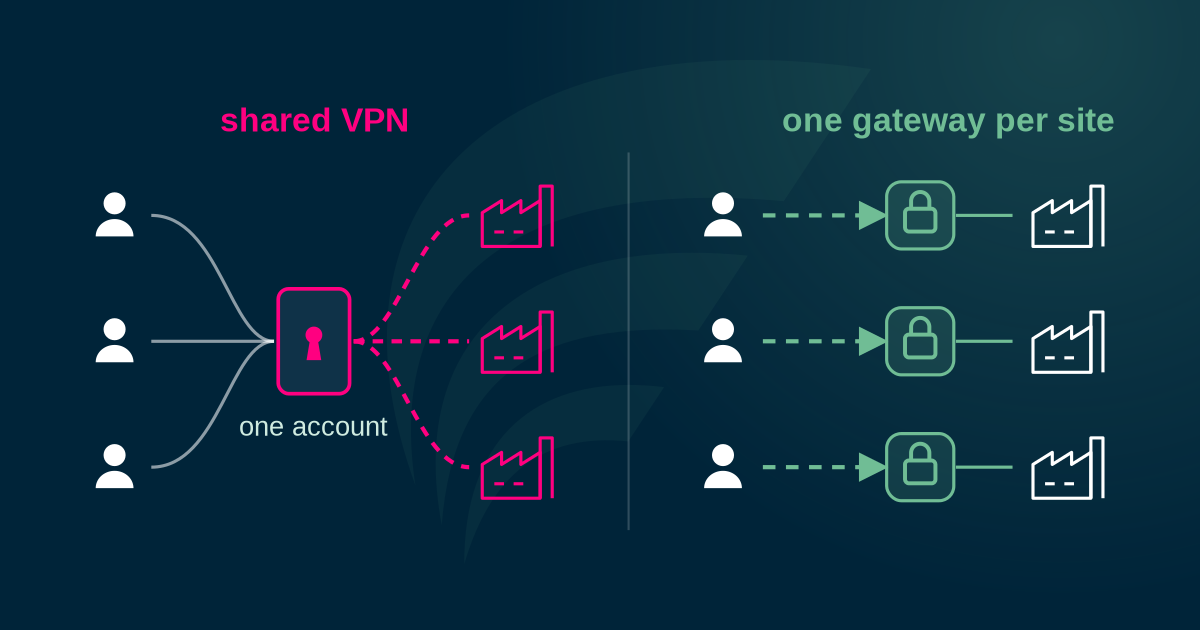
On an operational technology (OT) site, the risk of a shared virtual private network (VPN) lies less in the tunnel than in the sharing: one account for every technician and vendor, access to a network rather than to a machine, and no record of who did what. A gateway per site with Zero Trust access ties each session to a named person, a specific piece of equipment and an approval, and lets you isolate one site without touching the others.
On most industrial sites, remote maintenance still runs through a VPN that several people share: the integrator's engineers, the equipment maker's support, the night technician. It works, which is why it stays. But nobody can say who was connected last Tuesday, a single account opens every site it reaches, and taking one vendor out means changing the password for everyone else.
Operational technology (OT) is the set of systems that run physical equipment: production lines, pumps, substations, building management. It has constraints that IT access models don't account for. Brixio secures OT remote access on Cloudflare Zero Trust, site by site, as a managed service. This article goes through what a per-site design changes, and what it leaves to other tools.
What makes a shared VPN risky on an OT site?
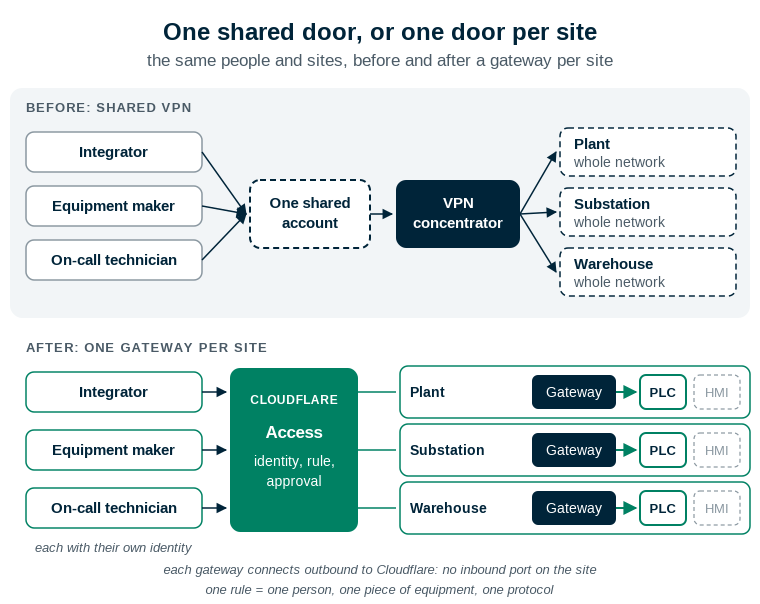
One identity stands for several people. A shared account tells you that a connection happened, not who opened it. When something changes on a controller at 2 a.m., the log shows the account, and the account may belong to several people at several companies.
The access is to a network, not to a machine. Once the tunnel is up, the technician reaches whatever that network reaches, not only the programmable logic controller (PLC) they came to fix, but the ones next to it, the supervisory control and data acquisition (SCADA) servers of the industrial control system (ICS) and the engineering workstations. Nothing in the VPN says "this person, this equipment, this protocol".
One tunnel can serve several sites. When the same concentrator and the same credentials connect a plant, a substation and a warehouse, a stolen credential opens all three. The blast radius is the sum of the sites.
Revocation is collective. Removing one vendor means changing the secret that everyone else uses, so it tends to be put off, and former contractors can keep working credentials.
The site exposes an inbound port, open at all times, so that the vendor can connect whenever it needs to.
None of this comes from the VPN technology itself. A VPN with individual accounts already fixes the identity problem. It doesn't change what each account can reach, or the open port on the site. The weakness is the sharing.
A shared VPN doesn't fail at encryption. It fails at telling you who was connected.
We cover a historical case of legitimate VPN access turned against an industrial operator in our article on five Cloudflare features for IT/OT security, so we won't repeat it here. For the definition of a VPN, see our glossary.
Why can't you apply IT Zero Trust to OT equipment as it is?
In IT, a Zero Trust deployment, with zero trust network access (ZTNA), most often leans on three things: an agent on the device, its security posture, and inspection of its traffic, including traffic encrypted with TLS (transport layer security). An OT site removes all three, and each constraint has a direct consequence for the design.
No agent on the equipment. A PLC or a human-machine interface (HMI) can't carry a client. Control therefore happens on the network, in front of the equipment, where a gateway decides who may reach it.
No decryption of encrypted traffic. Gateway, Cloudflare's secure web gateway, inspects HTTPS only when the device trusts a root certificate, and not at all with certificate pinning, self-signed certificates or mutual TLS (mTLS). Equipment that can't install that certificate stays outside inspection. The design controls who connects to what, not what passes inside the session.
The site has to keep working. A plant can't stop because a cloud link is down. That calls for a local gateway with failover, covered further down.
| Constraint | What the source says | Status | Design consequence |
|---|---|---|---|
| No agent on the equipment | Cloudflare Mesh can "route traffic to devices that cannot run the Cloudflare One Client" (Mesh documentation) | documented by Cloudflare | control sits on the network, in front of the equipment |
| No TLS decryption | "TLS decryption is required for HTTP policies to inspect HTTPS traffic", and it doesn't work with certificate pinning, self-signed certificates or mTLS (TLS decryption documentation) | documented mechanism | equipment traffic stays outside inspection; you control access, not content |
| The site must keep running if the link drops | the Cloudflare One Appliance runs as an active and standby pair (Appliance reference) | mechanism documented; Brixio design choice | two gateways on sites that cannot lose remote access |
| Failover between internet links | the Appliance "can failover between circuits according to their health" (Appliance reference) | documented by Cloudflare | more than one link where remote access matters, failover tested |
OT constraints, their source and their consequence. The constraints come from Cloudflare's documentation; the consequences are design choices.
What works for a laptop (an agent, a posture check, inspection) doesn't carry over to equipment installed for years. Zero Trust still applies; it moves from the device to the network in front of it. For a broader reference, NIST's Guide to Operational Technology (OT) Security, SP 800-82 Rev. 3 is the usual starting point, and our guide to IT and OT security convergence explains why the two worlds don't share the same rules.
What changes when each site gets its own gateway?
The site becomes a unit. Each site has its own gateway, connected to Cloudflare, and no longer exposes an inbound port. Two options are documented: Cloudflare Tunnel, which "creates outbound-only connections to Cloudflare's global network" without a public IP (Tunnel documentation), or the Cloudflare One Appliance, formerly Magic WAN Connector, a physical or virtual device that sets up IPsec tunnels and is managed remotely, with no IT staff on site (Appliance documentation).
People reach a piece of equipment, not a network. Equipment that can't run a client sits behind the gateway or behind a Cloudflare Mesh node (formerly WARP Connector, available since 14 April 2026), and every connection goes through identity rules first.
Nothing moves between the site's networks without a rule. On the Appliance, "the default behavior is to drop all LAN-to-LAN traffic" (network segmentation): flows are allowed one by one. Between sites, Cloudflare WAN (formerly Magic WAN) connects the sites and Cloudflare Network Firewall (formerly Magic Firewall) filters the traffic between them on explicit rules; both are Enterprise offers.
You can isolate one site without touching the others. Cutting access, auditing or changing a site becomes a local operation, and a compromise on one site stays on that site.
The Appliance has supported post-quantum encryption since February 2026 (changelog), and IPsec with validated third-party devices since April 2026 (changelog). It isn't the reason to move, but it matters for sites that will stay in service for a long time; see post-quantum readiness.
| Criterion | Shared VPN (common practice) | Per-site gateway with Zero Trust access | Source |
|---|---|---|---|
| Identity | one account for several people (individual accounts fix this) | one identity per person, vendors included | Access documentation |
| Scope | the network the tunnel reaches | one piece of equipment, one protocol, one user name | Access for Infrastructure |
| Record | a connection, without a person | one record per connection and per request | Access authentication logs |
| Removing a vendor | change everyone's secret | disable one rule | Access policies |
| Site exposure | an inbound port open | outbound-only connection | Tunnel documentation |
| Blast radius | every connected site | one site | consequence of the design |
| Equipment without an agent | reachable across the network | behind the gateway or a Mesh node | Mesh documentation |
| Content inspection | none | none either for equipment that can't trust a certificate | TLS decryption documentation |
| Continuity if the link drops | depends on the concentrator | gateway pair, failover between links | Appliance documentation |
The left column describes a practice, not a product. If your VPN already gives each person their own account, the first row is solved, and the others still apply.
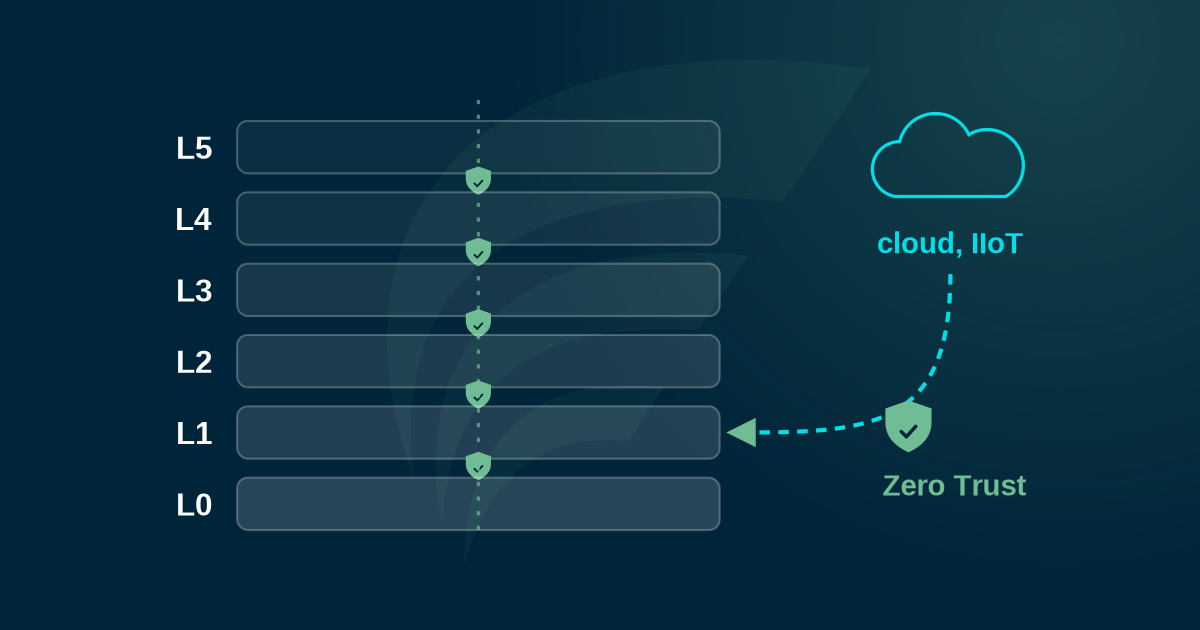
How to segment a site in levels, zones and conduits is the subject of our article on the Purdue model and Zero Trust. The wider frame is our approach to securing the IT/OT boundary, and the platform itself is on our Cloudflare One page.
How do technicians and equipment makers get in without a shared account?
Each person has an identity, including at the vendor: their own identity provider, or a one-time code when they don't have one. Cloudflare Access decides on that identity before anything reaches the site.
Each access covers one piece of equipment and one protocol. Access for Infrastructure sets the allowed ports, protocols and user names for each target.
Occasional access can require an approval for each session: with temporary authentication, an administrator approves or denies the request, and it has to be made again for every session. Access can also ask the user to enter a reason when they connect.
The vendor doesn't have to install anything. Access can render SSH, VNC and RDP sessions in the browser, without client software on the technician's laptop.
Every connection leaves a record. Access keeps authentication logs and per-request logs, which you send to your security information and event management system (SIEM), the tool that centralises and correlates security logs.
Removing a vendor means disabling one rule. Nobody else's access changes.
The equipment's firmware isn't touched at any point: access is decided in front of the equipment, not on it.
Give each vendor its own access policy with approval per session, even when it sends a single technician. Removing that vendor then takes one change, and nobody else's access moves.
For the corporate VPN your employees use, the method is different; see our page on Zero Trust access.
What happens when the site loses its internet link?
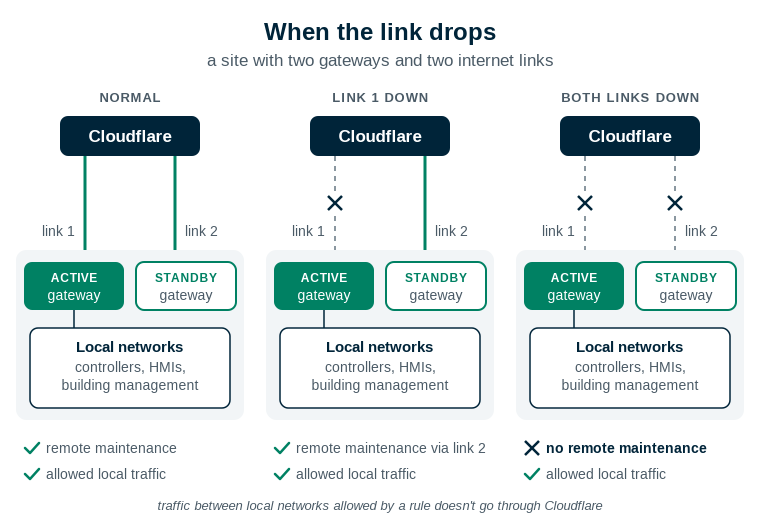
Two gateways cover a failed device. A site in high availability runs two Appliances: "only one node at any time is expected to be active", the other waits, and the election is automatic (Appliance reference).
Several links cover a failed line. With more than one WAN link, the Appliance "can failover between circuits according to their health", so losing one operator doesn't cut the site off. That only helps if the site has more than one link, which is a decision for the design stage, not after the first outage.
Some things keep working, others don't, and it's better to say so. Traffic between the site's local networks can stay on site when a rule allows it (network segmentation): that traffic doesn't go through Cloudflare. Remote maintenance, on the other hand, needs a link: with both links down, nobody connects from outside until one comes back. Tell the site manager before go-live, not during the outage.
Test the failover before go-live: cut the primary link during a maintenance window and check what the remote technician sees. A failover nobody has triggered is an assumption, not a design.
What does this architecture not cover?
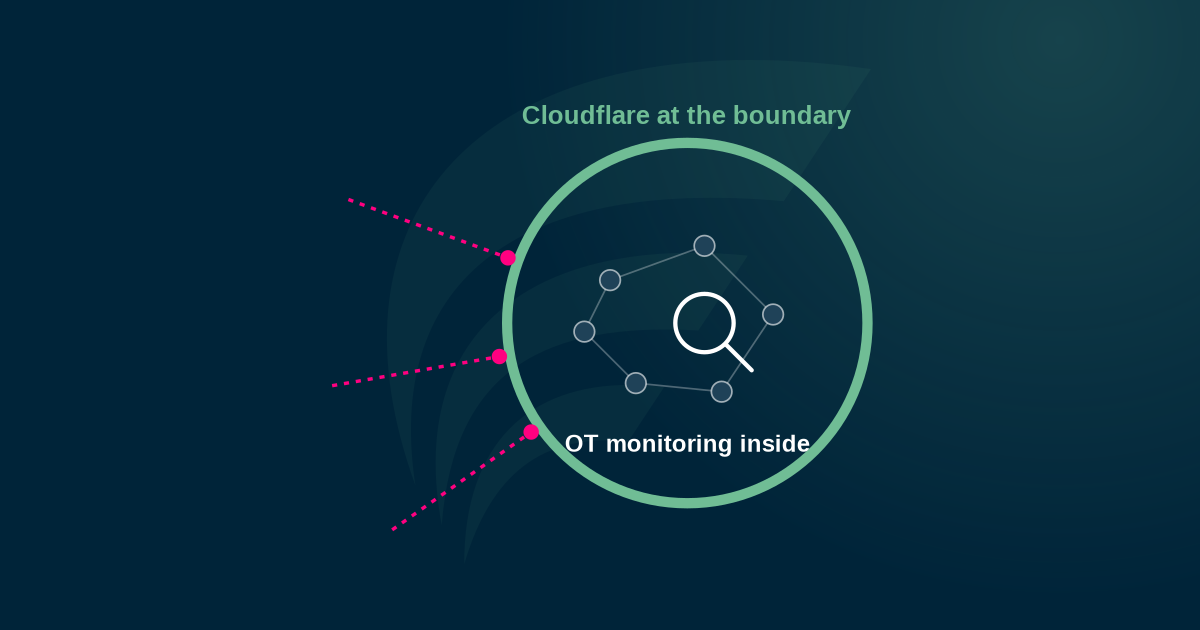
A per-site gateway with Zero Trust access controls who reaches which equipment, from where and for how long. It does not read industrial protocols, it cannot inspect encrypted traffic from devices that cannot trust a decryption certificate, and it does not check a controller's firmware: those stay with OT-native monitoring and with the equipment itself.
For session content, OT-native monitoring platforms read industrial protocols and detect abnormal commands; how Cloudflare and those tools fit together is covered in our comparison of Cloudflare and OT security vendors.
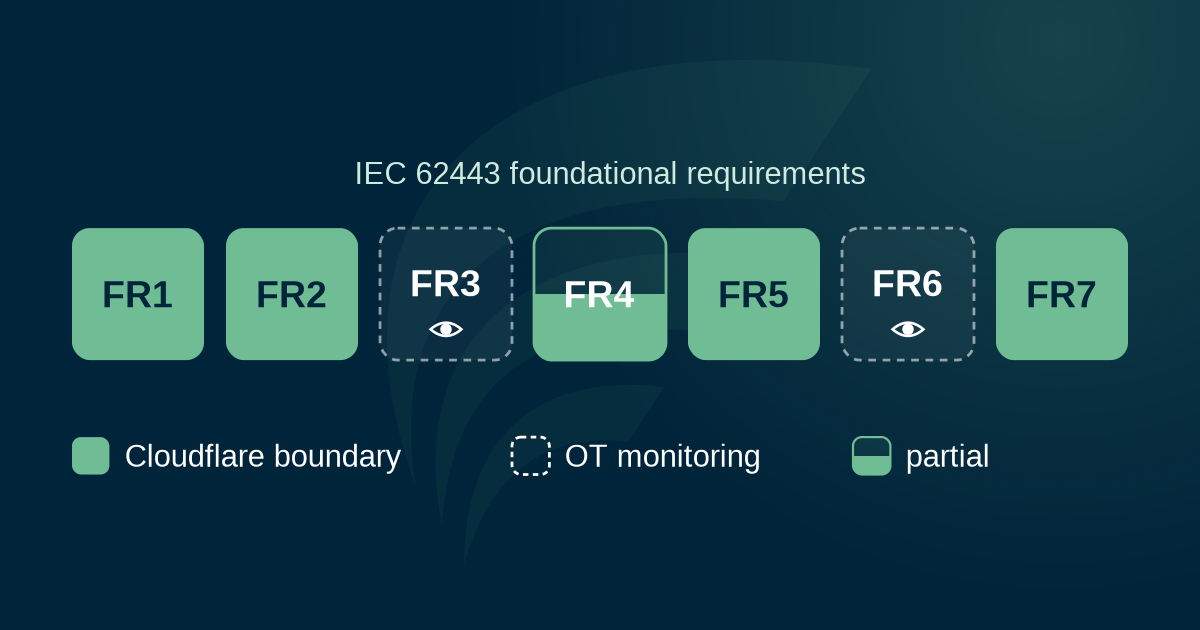
For equipment integrity, a controller's firmware and logic are checked on the equipment itself; how this maps to the standard's requirements is in our IEC 62443 article.
Brixio delivers this on Cloudflare Zero Trust, site by site, as a managed service: equipment that can't run an agent is connected at the network level, and its traffic goes through the security controls.
Cloudflare One runs on Cloudflare's network, without a device on site that enforces the rules: this design doesn't suit a site that has to run cut off from the Internet. Our Cloudflare One page lists that limit with the others.
Where should you start on an existing site?
- List every remote access path on each site.
- Pick a pilot site, not the most critical one.
- Write one rule per vendor and per piece of equipment.
- Plan continuity (a gateway pair, two links) before go-live, not after the first outage.
- Keep the VPN in place until the pilot meets its completion criteria, then remove it site by site.
Before replacing a shared VPN on an OT site, list every remote access path that exists today: who connects, to which equipment, with which account, through which vendor box. The paths nobody listed are the ones that stay open after the change.
Map your sites' remote access paths with an engineer →
Who can design and run this, site by site?
Brixio is one of Cloudflare's Authorized Service Delivery Partners (ASDP). We design the gateway for each site, set up access per vendor and per piece of equipment, then run the whole estate: 450+ projects delivered, ISO/IEC 27001:2022 certification, 24/7 operations from Paris, Dubai, Singapore, Casablanca and Zurich.
We don't make a remote access product, so the design follows your sites, not a catalogue. Once the sites are live, our managed services keep the rules, the logs and the failover tests current.
Zero Trust for OT sites: frequently asked questions
For encryption, yes. The problem on OT sites is the way VPNs are usually shared: one account for several people, access to a whole network rather than to one machine, and an inbound port left open on the site. Individual accounts fix the first point, not the other two.
No. Controllers and operator panels can't carry a client, so control happens in front of them: a gateway on the site, or a Cloudflare Mesh node, puts every connection through identity rules before it reaches the equipment.
Not in the same way. Inspecting encrypted traffic requires the device to trust a decryption certificate, which most OT equipment can't do. The per-site design controls who reaches which equipment. Reading industrial protocols stays with OT-native tools; recording the session itself is a layer Brixio builds on Cloudflare Workers.
Each technician gets their own identity, an access limited to the equipment and protocol they need, and, depending on the type of access, an approval per session if you require one. Separately, SSH, VNC and RDP sessions can open in the browser without software on their side. Brixio can record these sessions. The equipment's firmware isn't modified.
With two gateways and two links, the site fails over from one link to the other, and the standby gateway takes over if the active one fails. Traffic between the site's local networks allowed by a rule doesn't go through Cloudflare; remote maintenance needs at least one working link.
A per-site gateway with named access contributes to the standard's requirements on identifying users and restricting data flows at the boundary. Our IEC 62443 article maps each requirement in detail.