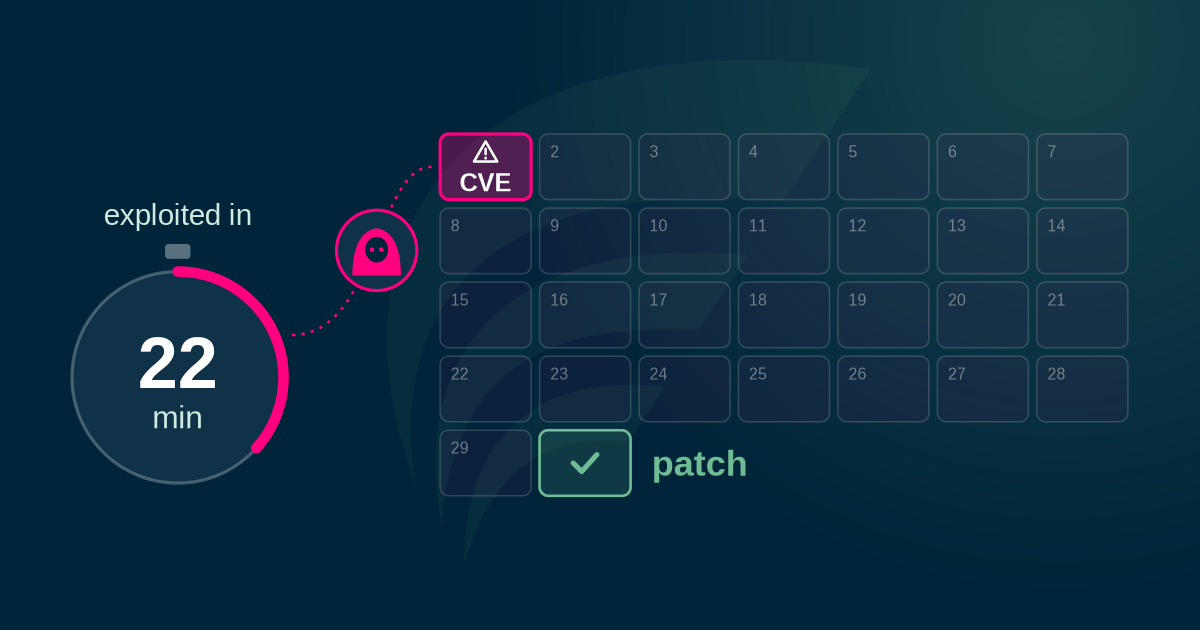
A new Citrix NetScaler vulnerability is published on a Tuesday morning. Your change window is on Saturday night, the appliance runs in a high-availability pair, and every remote employee signs in through it. According to Cloudflare at Connect 2026, the first exploitation now comes 22 minutes after a CVE (Common Vulnerabilities and Exposures, the public identifier of a flaw) is published. Between those two moments, the appliance stays reachable from anywhere on the internet.
This article explains how to take the appliance off the internet for the duration of the patch window, what a web application firewall (WAF) rule covers and what it does not, and how to triage the next bulletin. It builds on what Cloudflare announced at Connect 2026 and on our Cloudflare One page.
How fast are NetScaler flaws exploited now?
According to Cloudflare at Connect 2026, 22 minutes now separate the publication of a CVE from its first exploitation, and more than 22 threat actors targeted an unpatched Citrix NetScaler remote code execution (RCE) flaw. A Citrix NetScaler vulnerability on an internet-facing appliance is therefore exposed from the moment it is published, well before most organisations can schedule the fix.
Both figures come from the keynote of Grant Bourzikas, Cloudflare's security chief. His explanation: AI finds vulnerabilities faster than teams can fix them. Attackers work in minutes; defenders work in change management.
Remote access appliances are in the front line for three reasons:
- They are exposed by design. Their job is to answer connections from outside.
- Their login page is public. Anyone can reach it and probe it before authenticating.
- They sit in front of everything else. A compromised gateway opens the way to the internal network it was meant to protect.
Why isn't patching fast enough on its own?
The patch remains the only real fix, and nothing in this article replaces it. The problem is the time it takes to get there. Someone has to spot the bulletin, check whether the configuration meets its preconditions, test the new version, update both nodes of the pair without cutting off remote staff, then check that authentication still works. Each step is reasonable; together they take days.
Citrix bulletin CTX697174, first published on 3 October 2026, is a typical example. It only concerns appliances configured as a SAML service provider or identity provider (SAML is the protocol that lets one system vouch for a user's identity to another), lists the affected and fixed versions, and offers no mitigation other than upgrading. When the vendor has no workaround, the protection has to come from somewhere else.
When exploitation takes minutes and patching takes days, the protection has to sit in front of the appliance.
What did Cloudflare show at Connect 2026?
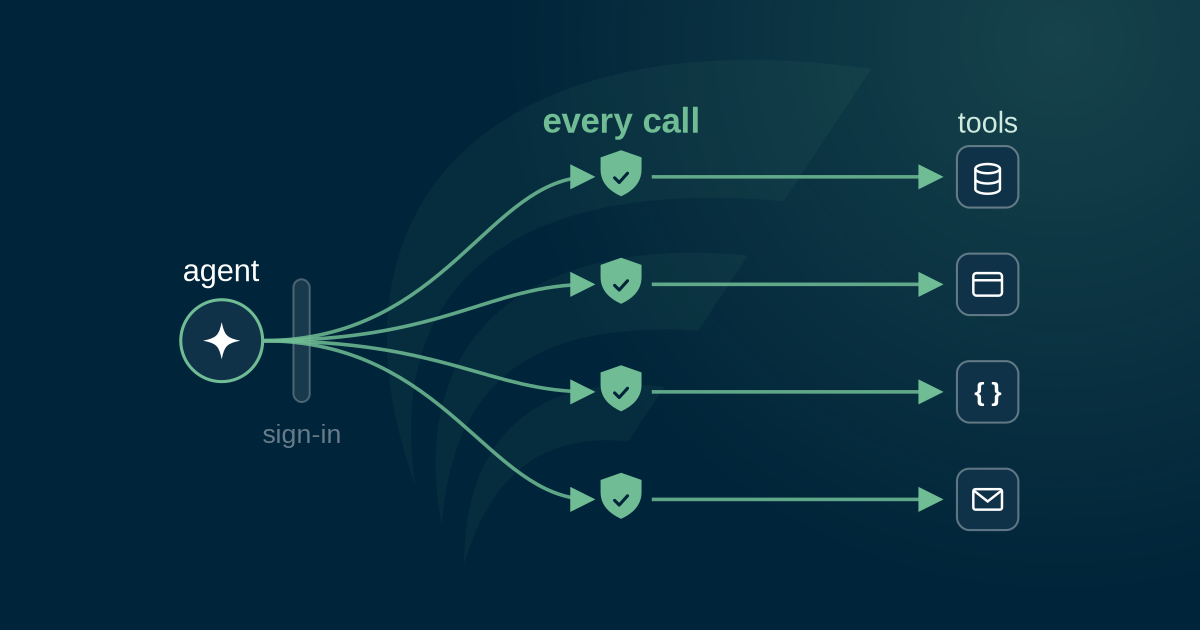
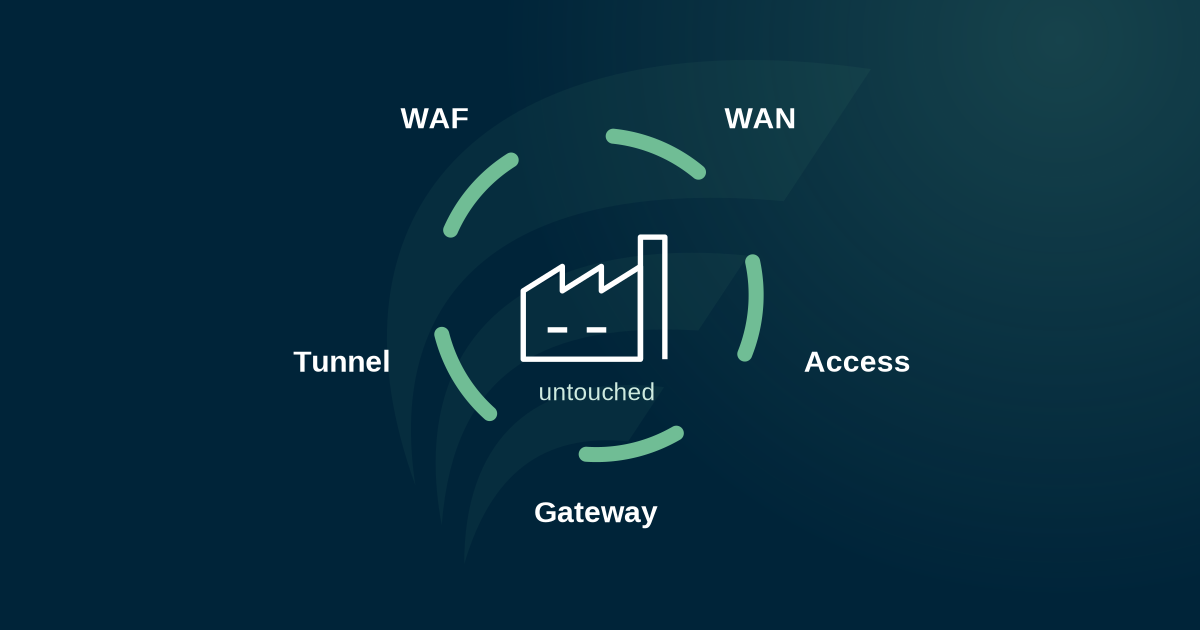
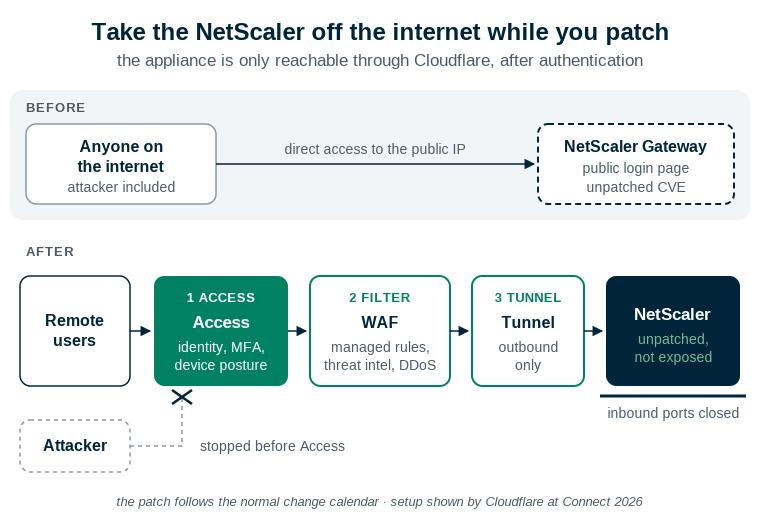
Cloudflare presented a three-layer setup on stage, in the order a request goes through it:
- Cloudflare Access authenticates every user before anything reaches the appliance.
- Cloudflare's WAF, threat intelligence and protection against distributed denial-of-service (DDoS) attacks filter what is allowed through.
- The unpatched NetScaler is reachable only through Cloudflare.
According to Cloudflare, this setup was deployed for 100,000 people at a large enterprise. The message from the stage: "you need a patch in a month, not today." The patch still has to be applied, but at the pace of normal change management rather than overnight.
What does the WAF change, concretely?
Cloudflare adds rules for known flaws to its Managed Ruleset, the set of WAF rules Cloudflare maintains and updates for its customers. Cloudflare's changelog includes two NetScaler rules in 2026, for NetScaler ADC (Application Delivery Controller) and NetScaler Gateway:
| Date | Flaw covered (Cloudflare's description) | Rule action |
|---|---|---|
| 14 July 2026 | CVE-2026-8451: insufficient input validation on NetScaler ADC and Gateway configured as a SAML identity provider; malformed unauthenticated requests trigger a memory overread that leaks sensitive data from adjacent memory | Block (previously Log) |
| 1 October 2026 | CVE-2026-88771: improper input validation on NetScaler ADC and Gateway, allowing an unauthenticated attacker to execute arbitrary commands (emergency release) | Block |
Rules in the Cloudflare Managed Ruleset, according to Cloudflare's changelog.
A WAF rule blocks known exploitation attempts for one CVE, as long as traffic reaches the appliance through Cloudflare. Three points to plan for:
- Traffic has to go through Cloudflare. If the appliance still answers on its public IP address, an attacker simply goes around the WAF.
- One rule covers one CVE. The next flaw needs its own rule, and Cloudflare itself still recommends installing the latest versions.
- The Managed Ruleset has to be deployed on the zone that serves the appliance (it requires a Pro plan or higher), with no exception or override that quietly neutralises the NetScaler rules.
Before relying on a WAF rule, check that the appliance no longer answers on its public IP address. A rule only sees traffic that goes through Cloudflare.
The WAF lowers the risk on flaws it already knows about. For the ones nobody has published yet, the access layer does the work. More on the WAF in web application and API protection.
What does Zero Trust access change?
Without Access, the NetScaler login page answers the whole internet, and so does every endpoint behind it. Two components change that:
- Cloudflare Tunnel connects the appliance to Cloudflare through outbound connections only. Inbound ports can then be closed on the firewall, so the appliance no longer has a public way in.
- An Access application on the public hostname decides who gets through: identity provider groups, multi-factor authentication (MFA), and device posture when the Cloudflare One Client is installed. An unauthenticated visitor lands on the Access sign-in page and is sent to your identity provider first.
What to test before switching over:
- The browser journey. With an Access application on a public hostname, users sign in as usual, after one Access check, and install nothing.
- Native clients. Clients that cannot complete a browser-based sign-in need another route, usually the Cloudflare One Client with a private application.
- A pilot group first, before the whole remote workforce.
With Cloudflare Access and Cloudflare Tunnel in front of it, and inbound access to its public IP address closed, an unpatched Citrix NetScaler no longer exposes its login page or any of its endpoints to the internet: only authenticated users on approved devices reach it, through Cloudflare's WAF and DDoS protection. The flaw is still there until the patch, but the attacker no longer has a way in.
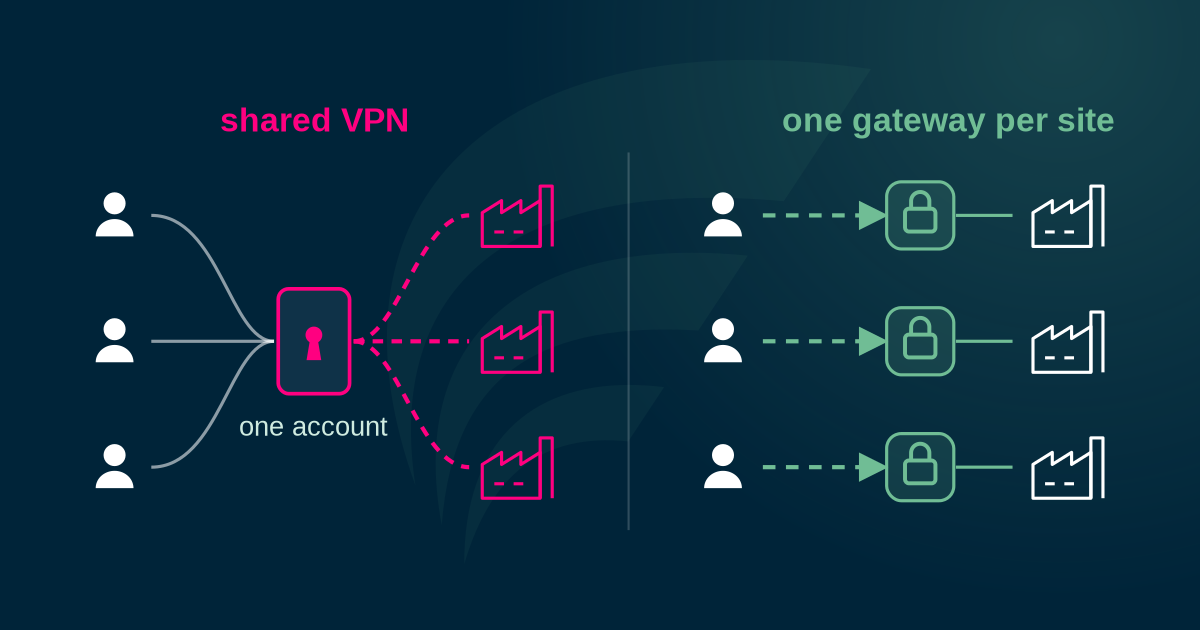
This is often the first step towards a wider move: once remote access goes through Access, you can move away from the VPN (virtual private network) application by application.
Shield your Citrix and legacy remote access →
How do you triage the next NetScaler CVE?
Cloudflare described a three-step triage on stage. Applied to a remote access appliance, it looks like this:
- Fix what is exploited. If the CVE is in the Known Exploited Vulnerabilities (KEV) catalogue of the US Cybersecurity and Infrastructure Security Agency (CISA), or in your threat intelligence feed, it comes first.
- Plan what is exploitable. An exposed appliance with the vulnerable configuration is next.
- Schedule the rest. Everything else follows the normal patch cycle.
The setup described above shortens the first step: an exploited CVE becomes a planned patch rather than an emergency in the middle of the night.
We wrote the checklist below from the Citrix bulletin, Cloudflare's WAF changelog and the Tunnel and Access documentation. It speeds up the first two steps.
Checklist: inventory of an exposed remote access appliance
| Check | Why | |
|---|---|---|
| ☐ | Exact version on each node of the high-availability pair | To compare with the fixed versions in the bulletin |
| ☐ | Features in use: SAML identity provider or service provider, Gateway, AAA virtual server (authentication, authorisation and accounting) | Bulletins set preconditions of this kind |
| ☐ | Does the appliance answer on its public IP address, outside Cloudflare? | A WAF rule only sees traffic that goes through Cloudflare |
| ☐ | Is the hostname served by a Cloudflare zone with the Managed Ruleset active? | Condition for the NetScaler rules to apply |
| ☐ | Are the NetScaler rules set to Block, with no exception that neutralises them? | A reviewed exception is better than a forgotten rule left in Log |
| ☐ | Do users connect through a browser, a native client, or both? | Decides between a public Access application and the Cloudflare One Client |
| ☐ | Is the CVE in the CISA KEV catalogue? | Step 1 of the triage |
Keep an up-to-date inventory of the features each appliance uses (SAML identity provider or service provider, Gateway, AAA virtual server). NetScaler bulletins often set preconditions of this kind, and the inventory turns an investigation into a lookup.
The same triage, applied to everything you expose, is the subject of attack surface reduction. For organisations in scope, it is also part of vulnerability management under NIS2.
Appliance already exposed or under attack? Call our emergency response team →
Does this work for other remote access appliances?
If your firewalls and VPN appliances keep getting CVEs, the reasoning is the same. It applies to any remote access appliance exposed to the internet, such as an SSL (Secure Sockets Layer) VPN gateway or a web access portal: take its login page off the internet, filter what gets through, and patch at your own pace. Check, appliance by appliance, what it exposes. A WAF can inspect HTTP traffic; a proprietary protocol needs a different route, through Tunnel and the Cloudflare One Client.
Then comes the underlying decision. Once access goes through Cloudflare, replacing the appliance with Zero Trust access can be decided calmly, rather than in the middle of an incident. That is the work of a migration to Cloudflare Zero Trust.
Where should you start?
In the order we would put this protection in place:
- List your exposed appliances, with their versions and the features in use.
- Put their hostnames behind Cloudflare and close direct access to their IP address, ideally through Tunnel.
- Deploy the Managed Ruleset and check that the NetScaler rules are active in Block.
- Pilot an Access application with one group of users.
- Monitor WAF events and Access logs.
- Patch at your own pace, then decide what to do with the appliance itself.
Brixio sets up and operates this protection on Cloudflare: application security, Zero Trust access and 24/7 monitoring through our managed SOC. We are an Authorized Cloudflare Service Delivery Partner (ASDP), certified ISO/IEC 27001:2022, with 450+ projects delivered and 24/7 operations from Paris, Dubai, Singapore, Casablanca and Zurich. For WAF work in the field, see how a leisure and entertainment destination developer in Saudi Arabia moved 80+ hostnames from Google WAF to Cloudflare with zero downtime.
Citrix NetScaler vulnerability: frequently asked questions
According to Cloudflare at Connect 2026, the first exploitation now comes 22 minutes after a CVE is published, and more than 22 threat actors targeted an unpatched NetScaler remote code execution flaw. An exposed appliance is therefore at risk from the day the bulletin comes out.
Partly. Cloudflare's Managed Ruleset added NetScaler rules on 14 July and 1 October 2026, both set to Block, which stop known exploitation attempts for those CVEs. They only apply to traffic that goes through Cloudflare, they do not cover the next flaw, and they do not replace the patch.
Access authenticates users before any request reaches the appliance, so its login page is no longer public. With Cloudflare Tunnel and inbound ports closed on the firewall, the appliance can only be reached through Cloudflare, after authentication.
No. The protection buys time, so that the patch follows your change window rather than an emergency. As Cloudflare put it at Connect 2026: "you need a patch in a month, not today."
Not for browser access: users sign in through Access in their browser, with nothing to install. Native clients that cannot complete a browser sign-in need the Cloudflare One Client and a private application.