The problem
Why do AI requests turn into API key requests?
Cloudflare noticed it early: "As people begin experimenting with AI at work, one of their first requests is often for API keys to company systems" (Cloudflare launch post). Sam Rhea, Cloudflare's CIO, tells the story of a salesperson who had built an app with AI and needed production access to about a dozen systems of record, plus admin rights on a deployment pipeline. His summary: "Keys plural." (Cloudflare blog). That is the moment an AI workspace stops being a productivity question and becomes an access question.
The people asking are rarely developers. Salespeople, analysts and operations staff who have never written code now build working tools with AI, a practice often called vibe coding, and those tools need data.
Hand the keys out, and you lose the thread
A key carries no identity and no scope beyond what it was issued with. In Cloudflare's own words, keys "often provide broad, long-lived access that is difficult to constrain, share safely, and audit". Once it has been copied into three apps and one script, nobody can say who used it, or for what. Keys also travel further than intended: GitGuardian counted 1,275,105 AI-service secrets exposed in public GitHub commits in 2025.
A key says what can be opened. It never says who opened it.
Refuse them, and the work moves
People keep the habit and change the tool: a personal AI account, a browser extension, whatever works on a Friday afternoon. That is shadow AI, and finding the AI tools adopted without approval is a job of its own. The same data shows the way out. In Netskope's telemetry, between October 2024 and October 2025, the share of AI users on personal AI apps fell from 78% to 47% while the share using organisation-managed accounts rose from 25% to 62%. Read one way, those figures suggest that once a managed tool exists, usage tends to move to it.
Keep the keys, stop handing them out
The way out is to give people the AI they ask for without giving them the keys behind it. Cloudflare applies this to its own engineers' AI coding tools: it reports 241.37 billion tokens routed through AI Gateway in 30 days, and states that "No API keys exist on user machines" (Cloudflare blog, 20 April 2026). That stack serves engineering and is not Cloudflare OS. Cloudflare OS, one of the subjects Cloudflare put forward at Connect 2026, applies the same principle to the agents everyone else in the company uses.
The split
Keep your suite, choose where the AI runs
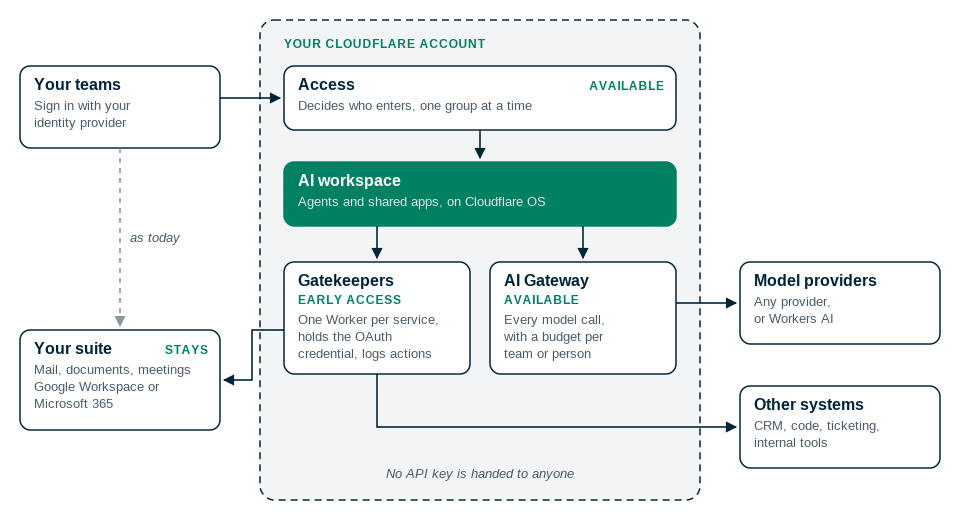
An AI workspace on Cloudflare does not replace Google Workspace or Microsoft 365: mail, documents and meetings stay in the suite. It takes the place of the AI layer and of the API keys handed to teams, reaching the suite through Gatekeepers, one Worker per service that holds the OAuth credential and logs every action.
OAuth is the standard that lets an application act for a user without seeing their password. Your suite keeps the same licences, the same administrators and the same habits. What changes is the AI layer: the workspace gives each employee agents that read and draft in their mail and files, plus small apps they can build with AI and share with colleagues. It runs in your company's Cloudflare account, behind Cloudflare Access, and every model call goes through AI Gateway.
Gatekeepers are provided in early access for Google Workspace and Microsoft 365. The 1 October 2026 update extended the Google one to Gmail drafts and sending, and to all or part of Drive.
| Stays in your suite | Moves to the AI workspace, in your Cloudflare account | |
|---|---|---|
| Mail, calendar | yes | Gmail, Google Calendar, Outlook mail and calendar: reached by an agent through a Gatekeeper, within the scopes you set |
| Documents, files | yes | Drive, Docs, Sheets, Slides, SharePoint, OneDrive: read by an agent through a Gatekeeper; exports to xlsx, CSV, PDF, Markdown and HTML (docx and pptx announced) |
| Meetings, chat | yes | not concerned (Teams is not covered; Google Chat is covered by the Google Gatekeeper) |
| AI assistant | your suite's assistant stays available if you keep it | the workspace's agents, with models chosen per team |
| API keys | none handed out; credentials held by Gatekeepers and AI Gateway | |
| Other systems (CRM, code, ticketing) | through a Gatekeeper provided by Cloudflare OS, one written for you, or MCP server portals |
And the assistant built into your suite?
Gemini in Google Workspace and Microsoft 365 Copilot run in their vendor's service, with the models that vendor offers: Google's for Gemini; for Copilot, the models Microsoft provides, which an administrator can extend to third-party models such as Anthropic's and OpenAI's. Access to advanced capabilities depends on your edition and licences. Both vendors publish clear commitments on training. Google states in its privacy hub that your content is not used for generative AI model training outside your domain without permission; Microsoft, that prompts, responses and data accessed through Microsoft Graph aren't used to train foundation LLMs.
An AI workspace in your Cloudflare account is a different model. You pick any provider behind AI Gateway, or models on Workers AI, you decide where it runs and which systems beyond the suite it reaches, and you run it yourselves or have it run. The two can coexist.
The architecture
What does a secure AI workspace look like in your Cloudflare account?
Four controls sit between your people and your data, and each of them knows who is asking. The software that ties them together is Cloudflare OS, open source since 5 August 2026.
Access decides who enters
Cloudflare Access, a component of Cloudflare One, Cloudflare's Zero Trust family, puts your identity provider in front of the workspace. Start with a pilot group, then widen one group at a time.
Gatekeepers hold the credentials
A Gatekeeper is a Worker, one per external service. It holds the OAuth credential, restricts what the agent can reach, logs every action and can require a validation before anything with a side effect happens. Cloudflare OS provides them for a list of services. On the Google side: Gmail, Docs, Sheets, Slides, Drive, Calendar, Chat and BigQuery. On the Microsoft 365 side: SharePoint, OneDrive, and Outlook mail and calendar, with the user's delegated permissions, so the agent never sees more than the user could open. An internal system needs a Gatekeeper of its own.
AI Gateway carries every model call
You open providers and models per team. Since 5 August 2026, AI Gateway can add the verified Access identity to each request, so spend limits can be set per authenticated user, provided the gateway sits on a custom domain protected by Access. Spend limits are cost-based budgets: once one is reached within its time window, AI Gateway blocks further requests with a 429 response. The documentation adds two caveats, enforcement is eventually consistent and it covers models with known pricing. Rate limits are a separate control, on the number of requests. Provider keys are stored in the gateway (bring your own key, with Secrets Store, in open beta), or you do without them through Unified Billing and a single Cloudflare bill.
MCP server portals for the servers you already run
If your teams already run MCP servers, MCP server portals put them behind one entry point, with a policy per portal. MCP, the Model Context Protocol, is the standard that connects an agent to tools and data (glossary).
Access and MCP server portals come from Cloudflare One, described on our Cloudflare One page. Cloudflare OS is not part of Cloudflare One: it runs on Cloudflare's Developer Platform and uses those two pieces.
The keys
Where do the keys live once nobody holds them?
In a Cloudflare-based AI workspace, nobody on the team holds an API key: service credentials stay in Gatekeepers, model provider access is managed in AI Gateway, and Cloudflare Access decides who enters.
| Key or credential | Where it lives | Who sees it | Who renews it |
|---|---|---|---|
| OAuth credential for a service (Gmail, Drive, Microsoft 365, GitHub…) | the service's Gatekeeper | nobody on the team; the agent receives a limited binding | the platform team, with the OAuth client registered as each Gatekeeper's README describes |
| Model provider key | AI Gateway, stored with Secrets Store (open beta), or no key at all with Unified Billing | gateway administrators; any token with AI Gateway Run permission can use it | the platform team |
| Entry to the workspace | no key: identity through Access and your identity provider | HR and IAM, as today | |
| Existing MCP servers | MCP server portals | the server owners |
The keys still exist. They stop travelling. An agent starts with access to nothing and receives a binding limited to one resource, while the credential behind it stays in the Gatekeeper (the mechanism, step by step). "Can I have a key?" turns into "Can my agent read this folder?", and that question has an answer you can scope and log.
Expert tip. Once your provider keys are stored in AI Gateway, the key to protect is the API token. Any token with AI Gateway Run permission can send requests through every gateway in the account, and spend those keys (documentation): scope tokens tightly and keep a list of who holds them.
Start with one team and one task.
Access on one group, one Gatekeeper in read-only mode, model budgets set before the first session. We scope the pilot with you.
Plan an AI workspace pilot- Read-only first
- Your own Cloudflare account
- No key handed out
The decisions
Which teams, which systems, which models: what do you decide first?
The technology is the easy part. Six decisions come before the first session, each has an owner, and a pilot moves faster when the owner has decided in advance, starting with whether the organisation is ready for agents at all. Spend is the one most often left for later: to measure model spend per application and per team over time, see our LLM observability use case.
Expert tip. Roll the workspace out by Access group, not by announcement. Each new group gets the same read-only Gatekeepers the pilot started with, and earns write access only after its own logs have been reviewed.
01
The first team, and one task
Owner: business leadership. Pick a team with a repeated task on data it already reads every day, such as account research, ticket triage or a weekly report, where AI saves real time and a mistake is easy to undo. One task is enough to learn from.
02
The systems it reaches, read or write
Owners: the CISO and the system owner. Start read-only. Each write you allow later is a separate decision, with its own validation rule in the Gatekeeper.
03
The models each team gets
Owners: the CIO, with the business. Not every task needs a frontier model. In Cloudflare's own deployment, according to its CIO, AI Gateway is used to gate models by role and to steer some use cases to more efficient models.
04
The budget, and what happens at the limit
Owners: finance and the business. A spend limit stops requests once it is reached; a dynamic route can send them to a cheaper model instead. Write the rule down before anyone reaches the limit: whether a sales team can live with a 429 at quarter end is a business call, easier to make in a meeting than in an incident.
05
The logs: where they go, how long they stay
Owners: the CISO and the data protection officer. Gatekeeper and AI Gateway logs are your audit trail. Agree on their destination and retention while the pilot is still small.
06
Who approves a write
Owner: the system owner. Sending an email, changing a record, merging code: a Gatekeeper can require a validation before any action with a side effect. Name the person who validates, whether they approve action by action or in a batch, and how quickly they are expected to answer.
The boundaries
What an AI workspace does not replace, and where it stops today
Saying where the workspace stops is part of deciding whether to start it.
Your suite
Mail, documents, calendars and meetings stay in Google Workspace or Microsoft 365. The workspace adds agents; it does not move your files or your inboxes.
Early access
Cloudflare OS is early access, with "many rough edges" in its README's words. Pilot it on non-critical tasks first.
The managed version
Cloudflare's managed version has been on a waitlist since 1 October 2026, with no date or price. Until it ships, you run the workspace yourselves, or we do.
Internal systems
Gatekeepers are provided for a list of services. Any internal system needs one written for it, on Workers.
Agents elsewhere
Agents that run inside SaaS applications, on laptops or in your own products are outside the workspace and need other controls.
Unapproved tools
Tools adopted without approval don't disappear when a sanctioned workspace arrives.
For internal systems, Gatekeepers are custom development on Workers. Agents running elsewhere are covered by agentic AI security and Zero Trust for AI agents, and detecting shadow AI remains worth doing once the workspace is live.
The operator
How does Brixio pilot, deploy and run your AI workspace?
Brixio, one of the leading Cloudflare Authorized Service Delivery Partners with more than 450 projects delivered, pilots, deploys and runs an AI workspace in the customer's own account. It is one of the projects we most enjoy scoping, because the first decisions are business ones.
A pilot with one team
- Access on one group
- One Gatekeeper in read-only mode
- Model rules and budgets in AI Gateway before the first session
- You see what the agents read before deciding what they may write
- The pilot ends with the decisions of section 05 written down, not just a demo
Deployed in your account
- The workspace runs in your Cloudflare account; model calls leave only through your AI Gateway
- Nothing leaves your account for ours
- The deployment repository belongs to you
Gatekeepers for your own systems
- For an internal system with no Gatekeeper provided, we build one on Workers, the platform Gatekeepers run on
Run day to day
- We operate Access, AI Gateway and your Workers 24/7
- Logs reviewed with your security team
- Updates of the Cloudflare OS core taken after review
Why Brixio
ASDP
Authorized Cloudflare Service Delivery Partner
100%
Cloudflare only
ISO/IEC 27001:2022
certified
450+
projects delivered
5
operational hubs: Paris, Dubai, Singapore, Casablanca, Zurich
When Cloudflare's managed version becomes available, the configuration will still be yours to decide: who has access, what context the agents get, and which systems they reach. Pilot and deployment fall under our professional services, day-to-day operation under our managed services. Our Workers work is public: brixio.io runs on Cloudflare Workers, and Bot Shield was built on Workers for an airline.